
Free WordPress Spam Comment Remover Plugin – Bulk Delete Spam Comments in Seconds
🆓 100% Free WordPress Plugin — No Premium Upsells, No Limitations The most powerful free spam comment cleaner with 15+ smart detection filters, instant bulk

🆓 100% Free WordPress Plugin — No Premium Upsells, No Limitations The most powerful free spam comment cleaner with 15+ smart detection filters, instant bulk
Your small business website isn’t just a digital brochure—it’s your storefront, your reputation, and often your primary source of leads and revenue. Unfortunately, it’s also
Your heart just sank. Your WordPress website is showing strange behavior—maybe you can’t log in, there’s weird content you didn’t add, or Google just slapped

Introduction When it comes to your WordPress website’s security, waiting for a problem to happen is not a strategy. A proactive approach is always better.

Introduction As a WordPress developer, you build the engines that power the web. But with that power comes the responsibility to build securely. A simple

Introduction As a small business owner, you wear many hats. You’re the CEO, the marketer, the customer service rep, and often, the IT department. With

Introduction Running a WooCommerce store is an exciting venture, but it comes with a profound responsibility: protecting your customers’ data and your business’s reputation. In

Introduction In the world of WordPress security, there are well-known threats and then there are legacy features that quietly pose a significant risk. The xmlrpc.php

Introduction As a WordPress site owner, you have many responsibilities, but one of the most critical is security. You can have strong passwords, firewalls, and
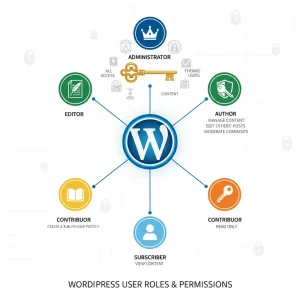
Introduction Managing a WordPress website, especially one with multiple contributors, is a team effort. But just like in any team, not everyone should have the